Text Detail Layer
Use the Text Detail layer to add individual text labels. These are usually used for branding or required gauge labels, but can also be used for scale values that require values different to their generated Linear Scale values.
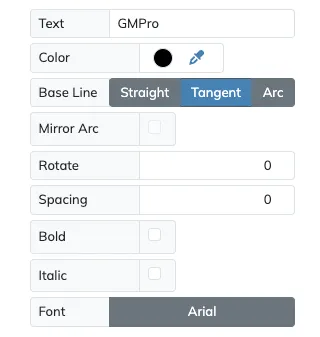
The settings for the Text Detail layer are very similar to the ones on the Common Text Arc Settings on the Text Arc layer.
Serial Numbers
Section titled “Serial Numbers”You can include a Serial Number text block within the Text field to add sequential serial numbers when printing multiple copies of your gauge design.
To add a Serial Number simply add {} to Text, including the starting serial number within the brackets. If you want any preceding zeros on the serial number make sure to include them as well. Your serial number can contain numbers as well as letters, and both will increase sequentially as required. Any text outside the brackets will remain untouched.
When processing a Serial Number block, the brackets will be removed from the text, so if you really need to print brackets at any time use {{ or }}, which will be replaced by single brackets.
For example, the Text GMP-{00A7} will result in the following sequence when printing 5 gauges:
GMP-00A7GMP-00A8GMP-00A9GMP-00B0GMP-00B1Use the Print Count option within Canvas Settings to choose the number of copies you want of your gauges with serial numbers.