Shape Detail Layer
The Shape Detail layer provides a quick way to add some geometric shapes commonly used on gauges.
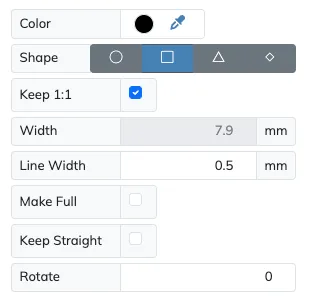
| Setting | Description |
|---|---|
| Color | Set the color of the selected shape with the Color selector. |
| Shape | Choose the shape to be drawn between Circle, Square, Triangle and Diamond. |
| Line Width | Set the line width for the shape drawn. |
| Make Full | Enable this setting to draw the selected shape as a solid instead of an outline. |
| Keep 1:1 | On by default, keeps the shape square, so its width always tracks the layer’s arc width. |
| Width | Revealed when Keep 1:1 is off, sets the shape’s tangential (horizontal) size independently of the arc width, in the current measurement unit. |
| Keep Straight | Enable this setting to keep the shape straight at its radial position, and keep disabled to make the image tangential at the current angle. |
| Rotate | This value will rotate the shape around its center, being 0° the default shape’s straight orientation. |