Measurement Units
GaugeMaster Pro works in real-world units. One canvas pixel is one standard CSS/SVG pixel (96 px = 1 inch = 25.4 mm), so the sizes you see on the canvas are true physical sizes, and printing is 1:1 by default. See the Print and Export Gauges page for the printing details.
The Unit Selector
Section titled “The Unit Selector”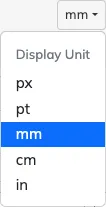
The unit selector on the settings toolbar offers the following measurement units:
px: pixelspt: pointsmm: millimeterscm: centimetersin: inches
Selecting a unit changes how every measurement field in the app is displayed and edited: radii, widths, positions, offsets, diameters and so on. The on-canvas radius value pills shown while dragging also display in the selected unit.
Sensible steps for every unit
Section titled “Sensible steps for every unit”Each unit has its own input precision and ticker steps, so the +/- buttons on the settings fields always move by a useful amount for the chosen unit, but within similar distance regardless of the unit. For example, a field steps by whole millimeters in mm, but by 0.05 in in.
Which unit will you see?
Section titled “Which unit will you see?”- The chosen unit is saved in each file and restored when the file is opened, so a document always reopens in the unit it was created in.
- The app also remembers the last unit you explicitly selected, and uses it for new files. Opening someone else’s file will not change your personal default.
- Files saved before GaugeMaster Pro 2 open in
px, matching how their numbers were originally created.