Refrigerant Gauge Wizard
The Refrigerant Gauge Wizard generates the temperature scales of a refrigerant (pressure-temperature) gauge for one or two gases, laid over an existing linear pressure arc, from saturation data for 35 refrigerants.
Licensing
Section titled “Licensing”Premium
Section titled “Premium”- Access to the Refrigerant Gauge Wizard requires a Premium subscription.
What it produces
Section titled “What it produces”Like all other wizards, this wizard generates standard layers. For each gas it adds a nonlinear Tickmarks Arc layer and a nonlinear Text Arc layer, plus a Color Arc layer for the scale edge (or the divider between two gases) and a Text Detail layer with the gas name at the bottom of the scale.
Everything stays fully editable afterwards with the regular layer tools, and files contain no special data.
Workflow
Section titled “Workflow”- Build the linear pressure arc with the Pressure Gauge Wizard first, and add it to the Canvas.
- Open the Refrigerant Gauge Wizard from the Gauge Wizards dropdown on the Layers Sidebar, on the same gauge.
- Start with the Refrigerant Wizard section. Nothing is prefilled from the gauge, but the wizard preview is drawn over the gauge with its existing layers dimmed, so lining the gas scales up against the pressure arc is visual.
- First set the base geometry of the gas scales with Tick Shape, then Dual Scale and Dual Arc for two gases or Scale Side for one, and the Inner Scale Edge and Outer Scale Edge that place each scale’s edge line.
- Then match the reference pressure arc with the Start Angle and End Angle, and enter its Unit, Start Pressure and End Pressure in the Reference Pressure Arc section.
- Set the All Scales section and the Inner Gas and Outer Gas sections for the look and the gases you need, and press Add To Canvas.
Re-run the wizard as many times as needed for further gases.
Wizard View
Section titled “Wizard View”The Show Gauges switch, on by default in this wizard, draws the gauge’s existing layers dimmed under the wizard preview, so the reference pressure arc, and any other previously added refrigerant gas scales, stay visible while a new gas scale is lined up against them.
Refrigerant Wizard
Section titled “Refrigerant Wizard”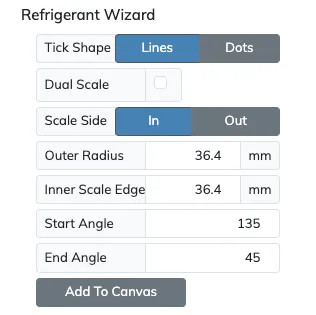
| Setting | Description |
|---|---|
| Tick Shape | Lines or Dots. With Dots the tickmarks sit centered on the scale’s edge line. Dual Scale is available with the Lines option only. |
| Dual Scale | Adds a second gas on the other side of the edge line, with its own Outer Gas section. |
| Scale Side | In or Out, for a single gas only. Sets whether the lone gas scale faces inward or outward. |
| Dual Arc | With Dual Scale enabled only. When on, the outer gas gets its own arc line. When off, the outer gas shares the inner gas’s arc line, which is drawn above both scales’ tickmarks, and its numbers keep the same Text Spacing from their ticks. |
| Outer Radius | The outer limit of everything the wizard generates, so nothing extends past it. It starts one quarter inside the gauge’s boundary, since gas scales usually sit inside an outer pressure scale. |
| Inner Scale Edge | The radius of the inner gas scale’s edge line, the line to match against the reference pressure arc, in the current measurement unit. |
| Outer Scale Edge | With Dual Scale and Dual Arc both on only. The radius of the outer gas scale’s edge line, which behaves the same way. |
| Arc Spacing | The gap between the two edges, when Dual Arc is on. |
| Start Angle | The start angle of the gas scale, which must match the reference pressure arc. |
| End Angle | The end angle of the gas scale, which must match the reference pressure arc. |
| Add To Canvas | Adds the generated layers to the selected gauge. When a chosen gas cannot be placed on the reference pressure arc, because its saturation pressures do not fall within it, that gas is not previewed and the button reads Gas Range Not On Pressure Arc and is disabled. |
Reference Pressure Arc
Section titled “Reference Pressure Arc”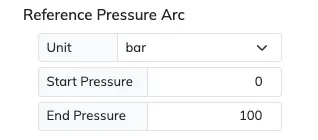
| Setting | Description |
|---|---|
| Unit | The pressure unit of the existing pressure arc. |
| Start Pressure | The first value of the existing pressure arc. |
| End Pressure | The last value of the existing pressure arc. |
All Scales
Section titled “All Scales”The shared styling fields, font, text spacing, major, mid and minor tick lengths and widths and arc line width, are the same as the All Scales section of the Pressure and Temperature wizards.
This wizard adds a Sign field right after Text Spacing, setting how the temperature labels show their sign, like the Text Arc layer’s Sign on number scales. Choose None for no sign at all, Only - (the default) so only negative temperatures carry a sign, or All so every non-zero temperature carries + or -.
Inner Gas and Outer Gas
Section titled “Inner Gas and Outer Gas”The Inner Gas section is always shown, and the Outer Gas section joins it when Dual Scale is on. Both have the same settings.
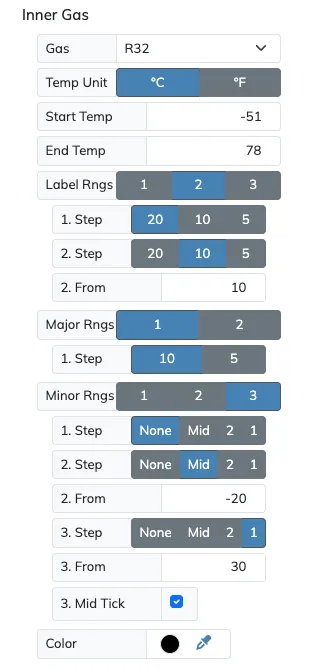
| Setting | Description |
|---|---|
| Gas | The refrigerant, one of the 35 supported refrigerants. That page lists each gas’s temperature range and the pressures it covers. |
| Temp Unit | °C or °F. |
| Saturation | Dew or Bubble. |
| Start Temp | The first displayed temperature. By default it is the first whole degree whose saturation pressure falls inside the pressure arc, so the gas scale spans the arc. A colder value extends the gas scale past the pressure arc, and a value inside truncates it. |
| End Temp | The last displayed temperature. By default it is the last whole degree whose saturation pressure falls inside the pressure arc. A hotter value extends the gas scale past the pressure arc, and a value inside truncates it. |
| Label Rngs | The number of ranges for the scale’s labels, up to 3 different ranges. |
| Major Rngs | The number of ranges for the scale’s major ticks, up to 2 different ranges. |
| Minor Rngs | The number of ranges for the scale’s minor ticks, up to 3 different ranges. |
| Color | The gas scale’s color. |
With two gases the edge or divider arc spans both gas scales, reaching the longer of the two.
Ranges
Section titled “Ranges”The labels, the major ticks and the minor ticks are each set on their own, and each can change along the scale. The Label Rngs, Major Rngs and Minor Rngs selectors pick how many ranges the scale is split into, and one group of fields is shown per range, numbered with its range, like 1. Step, 2. From and 2. Step.
| Setting | Description |
|---|---|
| Step | The temperature interval in that range. Labels offer 20, 10 and 5. Majors offer 10 and 5. Minors offer None for major ticks only, Mid for one tick halfway between majors every 5 degrees, 2 and 1. |
| From | Second and third ranges only. The temperature, in the gas’s unit, where that range starts. The first range always starts at the scale start. |
| Mid Tick | Shown while a minor range’s Step is 1, and on by default. Draws the tick halfway between two majors as a mid tick. When off, it is a plain minor tick. |
Steps count from the scale’s first number, so a scale starting at -90 with Step 20 continues at -70.